For deck builders and small residential contractors
Customer message and photos in. Materials, price and a quote out.
Paste what the customer sent you, add a few photos, and in about 3 minutes you get a full materials list for your store, a price with your own pay and profit worked in, and a quote ready to send.
Get startedHow it works
- Set it up once: your store, your day rate, your helper's pay, how you build.
- New job: paste the customer's message, add photos and your notes.
- Get the numbers: materials with quantities, labor days, the price, and what you keep.
- Send the quote: read it over, change anything, copy it into Messenger or email.
Example estimate
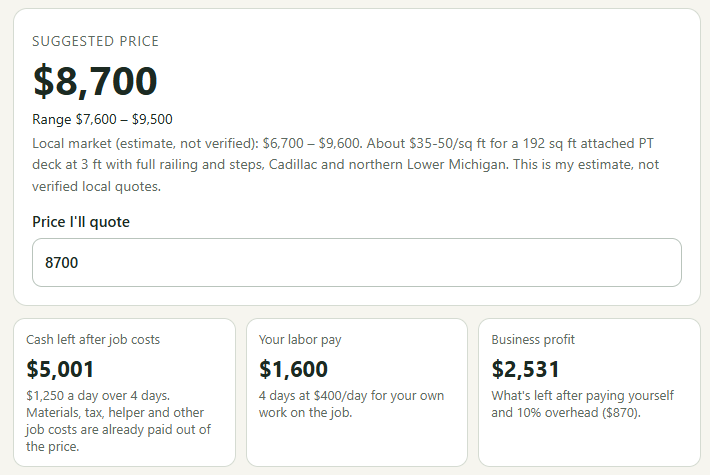
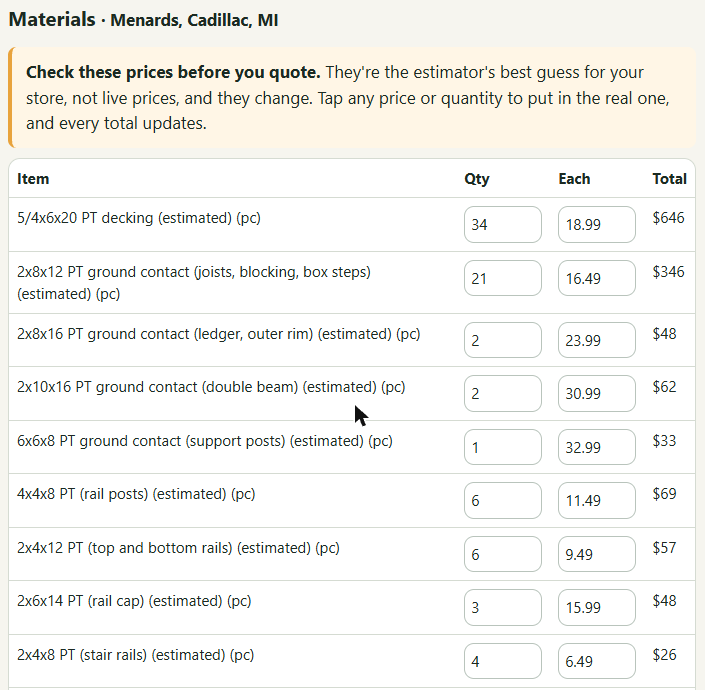
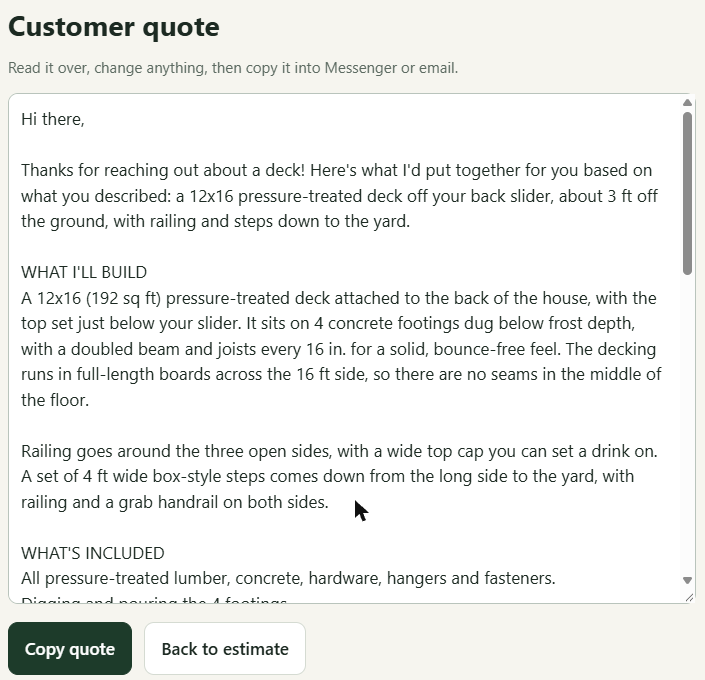
A sample 12x16 deck in Cadillac, MI, run through the app on Nov 25, 2026. This is an example of the output, not a customer's results.
Why I built it
I'm David, a builder in northern Michigan. Last year I started posting photos of my finished decks on Facebook Marketplace with a small paid boost, about $14 a week. I answered people on Messenger and used AI to work out materials and pricing. My prices went up, and customers still said yes.
Doing all that by hand, job after job, took time. Bid to Boards is that same estimating and quoting process, built into one app. Your results will depend on your market and your work.
What it isn't
- It doesn't sell you leads or jobs.
- It doesn't replace your judgment. Store prices are estimates, so check them, check your measurements, and you decide what goes to the customer.
Questions
What trades does it handle?
Decks are what it's been tested on most. It also handles other residential jobs like flooring, siding and remodel work. Check those numbers closely.
Does it work on my phone?
Yes. Open it in your phone's browser and add it to your home screen. Take the job photos right from the app.
Are the store prices live?
No. They're estimates for your store and town. Tap any price to put in the real number and every total updates.
How do I cancel?
Anytime. Open Manage my subscription (also under Help in the app), enter the email you signed up with, sign in from the email Stripe sends, and choose Cancel. If you cancel during the free trial, you're never charged.
Already a member? Sign in
Save it somewhere safe (a note on your phone or a screenshot). You'll use it to sign in on your phone and your computer. It's already filled in below.
No key yet? Get access
Help
Billing: Manage or cancel my subscription. Enter the email you signed up with, and Stripe emails you a way to sign in.
Report a problem
Something wrong with an estimate, a price, or the app? Tell us what happened. Every report gets read.
My setup
Set this once. Every estimate uses it.
Leave these off and your quotes won't promise them.
New job
A few questions first
What I see in the photos
Ask the customer
Your estimate
For your eyes only.
What the photos showed
Labor
The estimator's labor estimate. Change the total days if your crew is faster or slower.
Materials
Check these prices before you quote. They're the estimator's best guess for your store, not live prices, and they change. Tap any price or quantity to put in the real one, and every total updates.
| Item | Qty | Each | Total |
|---|
Where the money goes
Assumed
Verify on site
Customer quote
Read it over, change anything, then copy it into Messenger or email.
Next week's ad
Your last finished job sells the next one. Add photos of it, and get an ad to post and boost.
Post it with your best photo, then boost it locally. About $14 a week worked for the contractor who built this.
Working it out…